Your database holds the records your business runs on. So when it is time to move that data, nothing can go missing. Moreover, the systems that depend on it cannot stop for long.
That is why database migration feels risky to most IT teams. However, with the right plan, it is a controlled and predictable project. This guide walks you through every part of it. First, we explain what database migration means. Then we cover the types, strategies, step-by-step process, common risks and proven best practices.
What Is Database Migration?
Database migration is the process of moving data, schema, and database objects from one database environment to another. The move can be to a new database engine, a newer version, new hardware, or the cloud. A successful migration keeps data complete and accurate, keeps applications working, and keeps downtime as low as possible.
In simple terms, you are moving the “brain” of your applications to a new home. Besides the data itself, you also move tables, indexes, views, stored procedures, triggers, users and permissions.
Key takeaways
- Database migration moves data and database objects to a new engine, version, server or cloud platform.
- The two main strategies are big bang (one cutover) and phased (step by step, often with live replication).
- Most failures come from poor planning, untested code conversion and weak data validation, not from the data move itself.
- A tested rollback plan is the single best protection against a failed cutover.
- Expert DBA support cuts risk and downtime, especially for mission-critical systems in banking, telecom and government.
Why Do Businesses Migrate Their Databases?
Companies rarely migrate for fun. Usually, a clear business driver pushes the decision. Here are the most common ones:
- End of support. Older database versions stop getting security patches. As a result, staying on them becomes a compliance risk.
- High licensing costs. Many firms move from commercial engines to open-source options like PostgreSQL to cut yearly license fees.
- Cloud adoption. Teams move to AWS, Azure, Google Cloud or Oracle Cloud for easier scaling and lower hardware spend.
- Performance limits. Growing data volumes can outgrow old servers. Therefore, a newer platform brings faster queries and better uptime.
- Mergers and system consolidation. After a merger, two or more databases often need to become one.
- Modernization. New apps, microservices and analytics tools often need a modern data platform underneath.
In short, migration is usually about lower cost, lower risk, or room to grow. Often it is all three.

Types of Database Migration
Not every migration is the same. The type you choose shapes the effort, the tools and the risk. Here are the five main types.
| Type | What moves | Example | Complexity |
|---|---|---|---|
| Homogeneous migration | Data moves between the same engine | Oracle 12c to Oracle 19c | Low to medium |
| Heterogeneous migration | Data and code move to a different engine | Oracle to PostgreSQL | High |
| On-premises to cloud | Database moves from your data center to a cloud platform | SQL Server to Azure SQL | Medium to high |
| Version upgrade | Same engine, newer release | PostgreSQL 12 to PostgreSQL 16 | Low to medium |
| Storage or server migration | Same database, new hardware or storage | Old SAN to new all-flash storage | Low |
Homogeneous vs heterogeneous migration
A homogeneous migration keeps the same database engine. So the schema and code mostly work as they are. Native tools handle most of the job.
A heterogeneous migration changes the engine. Here, data types, SQL syntax and stored procedures often need conversion. For example, Oracle PL/SQL must be rewritten for PostgreSQL PL/pgSQL. Because of this, heterogeneous projects need more testing and more expert time.
Database Migration Strategies: Big Bang vs Phased vs Zero Downtime
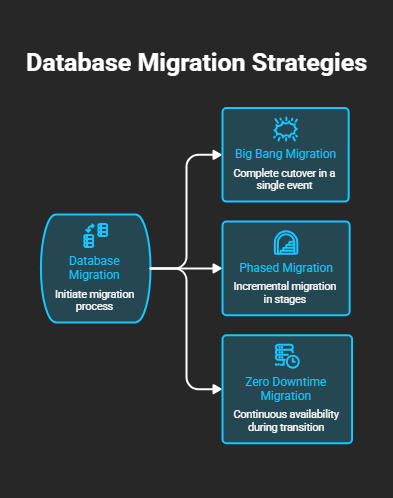
Your strategy decides how and when users switch to the new database. There are three common approaches.
1. Big bang migration
You move everything in one planned window, often over a weekend. Then all users switch to the new system at once.
- Best for: smaller databases and systems that can accept a few hours of downtime.
- Pros: simple, fast, and lower project cost.
- Cons: higher risk. If something fails, the whole system is affected.
2. Phased (trickle) migration
You move data in stages, such as by module, region or table group. Meanwhile, the old and new systems run side by side.
- Best for: large, complex databases with many applications.
- Pros: lower risk, because each stage is tested before the next one.
- Cons: longer timeline and more effort to keep both systems in sync.
3. Zero-downtime migration
This is a phased method that uses live replication or change data capture (CDC). First, you copy the full data set. Next, a replication tool keeps the target in sync with every new change. Finally, you switch users over in minutes.
- Best for: mission-critical systems like core banking, billing and telecom platforms.
- Pros: almost no downtime and an easy fallback path.
- Cons: needs skilled DBAs and the right replication tools.
Which strategy should you choose? Choose big bang if you can afford downtime. Choose phased or zero-downtime if your business runs 24×7.
The Database Migration Process: 7 Steps
A clear process turns a risky project into a repeatable one. Here is the seven-step approach that enterprise teams use.
Step 1: Assess the current database
First, take stock of what you have. List every schema, table, index, stored procedure, job and user. Also note the database size, growth rate and peak load times. Most importantly, map every application that connects to the database. A missed dependency is one of the top causes of post-migration outages.
Step 2: Define goals and choose the target
Next, decide what success looks like. Set clear targets for downtime, performance, cost and timeline. Then pick the target platform, version and hosting model. At this point, also choose your strategy: big bang, phased or zero downtime.
Step 3: Plan the migration
Now build the detailed plan. It should cover the tools, team roles, cutover window and communication plan. Above all, write a rollback plan. If the cutover fails, you must be able to return to the old system quickly and safely.
Step 4: Convert the schema and code
In a heterogeneous migration, this is the hardest step. Data types, functions and procedures must be mapped to the new engine. Automated tools can convert most objects. However, complex business logic still needs manual review by an experienced DBA.
Step 5: Test in a non-production environment
Before touching production, run a full trial migration. Test data accuracy, application functions and query speed. In addition, run load tests that copy real peak traffic. Fix every issue, then repeat the trial until it runs clean.
Step 6: Execute the migration and cutover
On migration day, follow the plan step by step. Freeze changes, run the final data sync, and switch the connections to the new database. Keep the old system available, so you can roll back if needed.
Step 7: Validate, tune and monitor
Finally, confirm the result. Compare row counts and checksums between source and target. Check that reports and transactions match. Then tune indexes and queries for the new platform. Keep close watch for the first few weeks, because some issues only appear under real workload.
Common Database Migration Challenges (and How to Solve Them)
Even well-planned projects hit problems. The good news is that most of them are known and preventable.
| Challenge | Why it happens | How to solve it |
|---|---|---|
| Data loss or corruption | Failed loads, encoding issues, broken constraints | Validate with row counts and checksums after every load |
| Long downtime | Large data volume moved in one window | Use replication or CDC for a near zero-downtime cutover |
| Code conversion errors | Different SQL dialects and data types | Use conversion tools, then review complex logic by hand |
| Poor performance after go-live | Old indexes and queries not tuned for the new engine | Run load tests early and tune before cutover |
| Hidden dependencies | Unknown apps, scripts or jobs still point to the old database | Map every connection during assessment |
| Security gaps | Users, roles and encryption not carried over | Rebuild access rules and audit them before go-live |
| Budget overrun | Scope grows during the project | Fix scope early and use a phased plan |
As you can see, the fix for most problems is the same: plan early and test often.
Database Migration Best Practices Checklist
Use this checklist before, during and after your project.
Before migration
- Take a full, verified backup of the source database
- Document every schema object, job and application connection
- Clean up unused tables, duplicate records and old data
- Set clear goals for downtime, performance and budget
- Write and test a rollback plan
During migration
- Run at least one full trial migration in a test environment
- Freeze schema changes until cutover is complete
- Monitor the replication lag and load progress in real time
- Keep business owners informed at every milestone
After migration
- Validate data with row counts, checksums and sample reports
- Tune indexes, statistics and memory settings
- Set up backups, monitoring and alerts on the new platform
- Keep the old system read-only for a set period, then retire it
One more tip: never treat migration as a pure IT task. Instead, involve the business users who know what “correct data” looks like.
Popular Database Migration Tools
The right tool depends on your source, your target and your downtime limit.
| Tool | Best used for |
|---|---|
| Oracle Data Pump | Exporting and importing Oracle data and schemas |
| Oracle GoldenGate | Real-time replication for zero-downtime migrations |
| Oracle Data Guard and RMAN | Platform moves and upgrades with a standby database |
| AWS DMS and Schema Conversion Tool | Moving databases to Amazon RDS or Aurora |
| Azure Database Migration Service | Moving SQL Server and other engines to Azure |
| Ora2Pg | Converting Oracle schema and code to PostgreSQL |
| pg_dump / pg_restore and pgloader | PostgreSQL moves and loading data from other engines |
Tools do the heavy lifting. Still, they do not replace expert judgment on design, testing and cutover.
How Long Does a Database Migration Take?
It depends on size, complexity and strategy. A small homogeneous upgrade can finish in a few days to a few weeks. On the other hand, a large heterogeneous move with heavy PL/SQL code can take several months.
The main factors are:
- Total data volume and number of objects
- Amount of stored procedure and application code to convert
- Number of connected applications
- Allowed downtime window
- Testing and compliance requirements
How Much Does Database Migration Cost?
Cost follows the same factors as time. In addition, you should budget for target licenses or cloud fees, migration tools, testing environments and expert labor. A failed migration, however, costs far more than a careful one. So investing in planning and testing almost always pays off.
Why Choose EDB Solution for Your Database Migration?
At EDB Solution, we deliver enterprise database solutions for mission-critical business. We support banks, telecom operators, government bodies, manufacturers, healthcare providers and educational institutions. So we know that every minute of downtime matters.
Here is what you get with our database migration services:
- Full assessment and planning. We map your data, code and dependencies before anything moves.
- Homogeneous and heterogeneous migrations. Oracle upgrades, Oracle to PostgreSQL, on-premises to cloud, and hybrid setups.
- Near zero-downtime cutover. We use replication and proven cutover plans for systems that must run 24×7.
- Data validation and performance tuning. We check every load and tune the new platform for speed.
- 24×7 DBA support after go-live. Our DBAs monitor, back up and protect your new environment.
- Corporate training. We train your in-house team, so they can run the new platform with confidence.
Ready to plan your migration? Talk to our database experts and get a clear, risk-free migration roadmap for your business.
Database Migration FAQs
What is database migration in simple words?
Database migration means moving your data and database objects from one system to another. For example, you might move from an old Oracle version to a new one, or from an on-premises server to the cloud.
What is the difference between data migration and database migration?
Data migration moves data between any storage systems, files or applications. Database migration is a type of data migration. It moves the whole database, including schema, code, users and settings, not just the data.
What are the 3 main database migration strategies?
The three main strategies are big bang, phased (trickle) and zero downtime. Big bang moves everything at once. Phased moves data in stages. Zero downtime uses live replication so users switch over in minutes.
Can a database be migrated without downtime?
Yes. With replication or change data capture tools, the new database stays in sync with the old one. As a result, the final switch takes only minutes.
What is the riskiest part of database migration?
The riskiest parts are code conversion and cutover. Untested stored procedures and missed app dependencies cause most failures. A full trial run and a rollback plan reduce this risk.
How do you validate data after migration?
Compare row counts and checksums between source and target. Then run key business reports on both systems and check that the results match.
Should we migrate from Oracle to PostgreSQL?
It can cut license costs and add flexibility. However, it needs careful code conversion and testing. An assessment will show whether the savings outweigh the effort for your workload.
Do I need a database migration service provider?
For small, simple moves, an in-house team may be enough. For mission-critical or heterogeneous migrations, an expert partner lowers risk, shortens downtime and protects your data.
Let’s Connect With EDB
Database migration is not just a technical move. Rather, it is a business project that affects every team that uses your data. With a clear strategy, a tested process and strong validation, you can migrate safely and on time.
If you want expert help at every step, EDB Solution is ready to support your next migration.